On this page
- The experiments
- Experiment 1a — Basic details and literal types
- Experiment 1b — All operator categories
- Experiment 2a — Largest of three (if-elif-else)
- Experiment 2b — Prime check
- Experiment 2c — break, continue, pass
- Experiment 3a — Factorial by recursion
- Experiment 3b — Function arguments
- Experiment 4 — String slicing and methods
- Experiment 5 — List operations and comprehension
- Experiment 6 — Tuple packing and immutability
- Experiment 7 — Set operations
- Experiment 8 — Dictionary operations
- Experiment 9 — Count vowels, consonants, digits and spaces
- Experiment 10 — Copy one file to another
- Experiment 11 — CSV processing
- Experiment 12 — try-except-finally
- Experiment 13 — Student class
- Experiment 14 — Single and multilevel inheritance
- Experiment 15 — Stack and queue
- Experiment 16 — Singly linked list
- Experiment 17 — Tkinter — Label, Entry, Button
- Experiment 18 — Tkinter — calculator
- Lab exam tips
- What the practical record should contain
- Each program, on its own page
18 experiments, each set out as 1. Question, 2. Aim, 3. Steps, 4. Programme, 5. Execution and Results.
All programs are in
labs/course-3-python/. All eighteen were run under Python 3.11 for this page, and what each
printed is shown under 5. Execution and Results. The two Tkinter programs need a display:
they were run under a virtual one, by a driver beside each (_drive_17_tkinter_input.py,
_drive_18_tkinter_calculator.py) that types into the window, presses its buttons and checks
what it shows, and the window is shown as it looked.
bash tools/data-science/run_python_labs.sh        # re-run everything
python3 labs/course-3-python/05_list_operations.py
The experiments
| # | Experiment | File | Unit |
|---|---|---|---|
| 1a | Basic details and literal types | 01a_basic_details.py |
1 |
| 1b | All operator categories | 01b_operators.py |
1 |
| 2a | Largest of three (if-elif-else) |
02a_largest_of_three.py |
2 |
| 2b | Prime check using loops | 02b_prime_check.py |
2 |
| 2c | break, continue, pass |
02c_loop_control.py |
2 |
| 3a | Factorial by recursion | 03a_factorial_recursion.py |
2 |
| 3b | Function argument types | 03b_function_arguments.py |
2 |
| 4 | String slicing and methods | 04_string_operations.py |
3 |
| 5 | List operations and comprehension | 05_list_operations.py |
3 |
| 6 | Tuple packing and immutability | 06_tuple_operations.py |
3 |
| 7 | Set operations | 07_set_operations.py |
3 |
| 8 | Dictionary operations | 08_dictionary_operations.py |
3 |
| 9 | Count vowels, consonants, digits, spaces | 09_count_file_characters.py |
4 |
| 10 | Copy one file to another | 10_copy_file.py |
4 |
| 11 | Process marks from a CSV | 11_csv_marks.py |
4 |
| 12 | try-except-finally |
12_exception_handling.py |
4 |
| 13 | Student class | 13_student_class.py |
4 |
| 14 | Single and multilevel inheritance | 14_inheritance.py |
4 |
| 15 | Stack and queue, list and linked | 15_stack_queue.py |
5 |
| 16 | Singly linked list | 16_linked_list.py |
5 |
| 17 | Tkinter — Label, Entry, Button | 17_tkinter_input.py |
5 |
| 18 | Tkinter — calculator | 18_tkinter_calculator.py |
5 |
Experiment 1a — Basic details and literal types
1. Question
Unit 1. Display basic details using print() and demonstrate the different literal types: int, float, string, boolean, complex.
2. Aim
Print a student's details, and name the type of each kind of literal.
3. Steps
- Assign one literal of each type.
- Print the details.
- Name the type of each value.
type(value).__name__gives the type's name. - The two parts of a complex number.
4. Programme
"""Experiment 1(a): Display basic details using print() and demonstrate the
different literal types (int, float, string, boolean, complex).

Syllabus: Course 3, Unit 1 -- literals, variables, built-in data types.
"""

# Step 1: Assign one literal of each type
name = "Raghav"           # str literal
roll_number = 24001       # int literal
department = "Data Science"
cgpa = 8.75               # float literal
is_enrolled = True        # bool literal
impedance = 3 + 4j        # complex literal

# Step 2: Print the details
print("STUDENT DETAILS")
print("-" * 40)
print(f"Name       : {name}")
print(f"Roll number: {roll_number}")
print(f"Department : {department}")
print(f"CGPA       : {cgpa}")
print(f"Enrolled   : {is_enrolled}")

# Step 3: Name the type of each value
print("\nLITERAL TYPES")
print("-" * 40)
for value in (roll_number, cgpa, name, is_enrolled, impedance):
    print(f"{str(value):<20} -> {type(value).__name__}")

# Step 4: The two parts of a complex number
# A complex number carries .real and .imag attributes.
print(f"\nreal part of {impedance} = {impedance.real}")
print(f"imag part of {impedance} = {impedance.imag}")
5. Execution and Results
OUTPUT
STUDENT DETAILS
----------------------------------------
Name       : Raghav
Roll number: 24001
Department : Data Science
CGPA       : 8.75
Enrolled   : True

LITERAL TYPES
----------------------------------------
24001                -> int
8.75                 -> float
Raghav               -> str
True                 -> bool
(3+4j)               -> complex

real part of (3+4j) = 3.0
imag part of (3+4j) = 4.0
RESULT
The details print as labelled lines, and the five literals are an int, a float, a str, a bool and a complex, whose real and imaginary parts are 3.0 and 4.0.
Experiment 1b — All operator categories
1. Question
Unit 1. Perform arithmetic, relational, logical, bitwise and assignment operations on two integers given as input (here 12 and 5).
2. Aim
Show what each operator gives on the same two numbers.
3. Steps
- Read two integers.
input()returns text, so each is converted withint(). - Arithmetic.
- Relational.
- Logical.
- Bitwise.
- Augmented assignment.
- Identity and membership.
4. Programme
"""Experiment 1(b): Perform arithmetic, relational, logical, bitwise and
assignment operations on given inputs.

Syllabus: Course 3, Unit 1 -- classification of operators.
Sample input: 12 5
"""

# Step 1: Read two integers
a = int(input("Enter the first integer : "))
b = int(input("Enter the second integer: "))

# Step 2: Arithmetic
print(f"\nARITHMETIC   (a = {a}, b = {b})")
print(f"  a + b  = {a + b}")
print(f"  a - b  = {a - b}")
print(f"  a * b  = {a * b}")
print(f"  a / b  = {a / b}      <- true division, always a float")
print(f"  a // b = {a // b}      <- floor division")
print(f"  a % b  = {a % b}")
print(f"  a ** b = {a ** b}")

# Step 3: Relational
print("\nRELATIONAL")
for symbol, result in (("==", a == b), ("!=", a != b), (">", a > b),
                       ("<", a < b), (">=", a >= b), ("<=", a <= b)):
    print(f"  a {symbol:<2} b = {result}")

# Step 4: Logical
print("\nLOGICAL")
print(f"  (a > 0) and (b > 0) = {(a > 0) and (b > 0)}")
print(f"  (a > 0) or  (b < 0) = {(a > 0) or (b < 0)}")
print(f"  not (a > b)         = {not (a > b)}")

# Step 5: Bitwise
print("\nBITWISE")
print(f"  a = {a} = {a:b} in binary, b = {b} = {b:b} in binary")
print(f"  a &  b = {a & b}")
print(f"  a |  b = {a | b}")
print(f"  a ^  b = {a ^ b}")
print(f"  ~a     = {~a}")
print(f"  a << 1 = {a << 1}")
print(f"  a >> 1 = {a >> 1}")

# Step 6: Augmented assignment
print("\nASSIGNMENT (augmented)")
x = a
x += b; print(f"  x += b -> {x}")
x -= b; print(f"  x -= b -> {x}")
x *= b; print(f"  x *= b -> {x}")
x //= b; print(f"  x //= b -> {x}")

# Step 7: Identity and membership
print("\nIDENTITY and MEMBERSHIP")
print(f"  a is b     = {a is b}")
print(f"  a in [a, b] = {a in [a, b]}")
5. Execution and Results
OUTPUT
Enter the first integer : 12
Enter the second integer: 5

ARITHMETIC   (a = 12, b = 5)
  a + b  = 17
  a - b  = 7
  a * b  = 60
  a / b  = 2.4      <- true division, always a float
  a // b = 2      <- floor division
  a % b  = 2
  a ** b = 248832

RELATIONAL
  a == b = False
  a != b = True
  a >  b = True
  a <  b = False
  a >= b = True
  a <= b = False

LOGICAL
  (a > 0) and (b > 0) = True
  (a > 0) or  (b < 0) = True
  not (a > b)         = False

BITWISE
  a = 12 = 1100 in binary, b = 5 = 101 in binary
  a &  b = 4
  a |  b = 13
  a ^  b = 9
  ~a     = -13
  a << 1 = 24
  a >> 1 = 6

ASSIGNMENT (augmented)
  x += b -> 17
  x -= b -> 12
  x *= b -> 60
  x //= b -> 12

IDENTITY and MEMBERSHIP
  a is b     = False
  a in [a, b] = True
RESULT
On 12 and 5: / gives 2.4, always a float, while // gives 2 and % 2; 12 & 5 is 4, 12 | 5 13 and ~12 −13; a is b is False and a in [a, b] True.
Experiment 2a — Largest of three (if-elif-else)
1. Question
Unit 2. Find the largest of three numbers using if-elif-else (here 45, 78 and 23).
2. Aim
Choose the largest of three numbers by comparison.
3. Steps
- Read three numbers.
- Compare them with if-elif-else.
- Print the largest, and check it with max(). The built-in
max()is the cross-check — correct, but the exam wants theif-elif-elseversion.
4. Programme
"""Experiment 2(a): Find the largest of three numbers using if-elif-else.

Syllabus: Course 3, Unit 2 -- control flow.
Sample input: 45 78 23
"""

# Step 1: Read three numbers
a = float(input("Enter the first number : "))
b = float(input("Enter the second number: "))
c = float(input("Enter the third number : "))

# Step 2: Compare them with if-elif-else
if a >= b and a >= c:
    largest = a
elif b >= a and b >= c:
    largest = b
else:
    largest = c

# Step 3: Print the largest, and check it with max()
print(f"The largest of {a}, {b}, {c} is {largest}")

# Built-in alternative -- correct, but the exam wants the if-elif-else version.
print(f"Cross-check with max(): {max(a, b, c)}")
5. Execution and Results
OUTPUT
Enter the first number : 45
Enter the second number: 78
Enter the third number : 23
The largest of 45.0, 78.0, 23.0 is 78.0
Cross-check with max(): 78.0
RESULT
The largest of 45, 78 and 23 is 78, and max() agrees.
Experiment 2b — Prime check
1. Question
Unit 2. Check whether a number is prime using loops (here 29).
2. Aim
Decide whether n is prime, testing as few divisors as possible.
3. Steps
- Read n.
- A number below 2 is not prime.
- Try each divisor up to the square root.
breakleaves the loop at the first divisor found. - Report the result.
THE METHOD
Test divisors only up to √n. If n had a factor larger than its square root, the
matching co-factor would be smaller than the square root and you would have
found it already. Write the loop as while divisor * divisor <= n rather than
computing a square root — it avoids floating-point comparison entirely.
Remember that 0, 1 and negative numbers are not prime, and 2 is the only even prime.
4. Programme
"""Experiment 2(b): Check whether a number is prime using loops.

Only test divisors up to sqrt(n): if n has a factor larger than its square
root, the matching co-factor is smaller than the square root and would have
been found already.

Syllabus: Course 3, Unit 2 -- iterative statements.
Sample input: 29
"""

# Step 1: Read n
n = int(input("Enter a number: "))

# Step 2: A number below 2 is not prime
if n < 2:
    print(f"{n} is not a prime number (primes start at 2)")
else:
    is_prime = True
    divisor = 2
    # Step 3: Try each divisor up to the square root
    while divisor * divisor <= n:
        if n % divisor == 0:
            is_prime = False
            print(f"{n} is divisible by {divisor}")
            break
        divisor += 1

    # Step 4: Report the result
    print(f"{n} is {'a prime' if is_prime else 'not a prime'} number")
5. Execution and Results
OUTPUT
Enter a number: 29
29 is a prime number
RESULT
29 has no divisor from 2 to 5, so it is prime.
Experiment 2c — break, continue, pass
1. Question
Unit 2. Illustrate the loop control statements break, continue and pass.
2. Aim
Show what each of the three statements does to the same loop.
3. Steps
- break.
- continue.
- pass.
- else on a loop. A loop's
elseruns only when the loop was not broken out of.
4. Programme
"""Experiment 2(c): Illustrate the loop control statements break, continue
and pass.

  break    -- leave the loop immediately
  continue -- skip the rest of this iteration, go to the next
  pass     -- do nothing; a syntactic placeholder where a statement is required

Syllabus: Course 3, Unit 2 -- loop control statements.
"""

# Step 1: break
print("break -- stop as soon as we reach 5")
for i in range(1, 11):
    if i == 5:
        break
    print(f"  {i}", end="")
print("\n")

# Step 2: continue
print("continue -- skip the even numbers")
for i in range(1, 11):
    if i % 2 == 0:
        continue
    print(f"  {i}", end="")
print("\n")

# Step 3: pass
print("pass -- placeholder, the loop body does nothing for multiples of 3")
for i in range(1, 11):
    if i % 3 == 0:
        pass          # a branch we have not written yet; keeps the code valid
    else:
        print(f"  {i}", end="")
print("\n")

# Step 4: else on a loop
print("else with a loop -- runs only when the loop was NOT broken out of")
for i in range(1, 4):
    print(f"  iteration {i}")
else:
    print("  loop finished without a break")
5. Execution and Results
OUTPUT
break -- stop as soon as we reach 5
  1  2  3  4

continue -- skip the even numbers
  1  3  5  7  9

pass -- placeholder, the loop body does nothing for multiples of 3
  1  2  4  5  7  8  10

else with a loop -- runs only when the loop was NOT broken out of
  iteration 1
  iteration 2
  iteration 3
  loop finished without a break
RESULT
break stops the count at 4; continue skips the even numbers; pass does nothing, so the multiples of 3 are simply not printed; and the loop's else runs because nothing broke out of it.
Experiment 3a — Factorial by recursion
1. Question
Unit 2. Calculate the factorial of a number using recursion (here 6).
2. Aim
Compute n! recursively, and trace the calls.
3. Steps
- The recursive function: a base case and a recursive case. Without the base case the recursion never stops.
- The same function, printing each call.
- Read n, and print n! and the call trace.
4. Programme
"""Experiment 3(a): Calculate the factorial of a number using recursion.

Syllabus: Course 3, Unit 2 -- recursive functions.
Sample input: 6
"""


# Step 1: The recursive function: a base case and a recursive case
def factorial(n):
    """Return n! computed recursively."""
    if n < 0:
        raise ValueError("factorial is undefined for negative numbers")
    if n in (0, 1):          # BASE CASE -- stops the recursion
        return 1
    return n * factorial(n - 1)   # RECURSIVE CASE


# Step 2: The same function, printing each call
def factorial_traced(n, depth=0):
    """Same function, printing the call stack so you can trace it in a viva."""
    indent = "  " * depth
    print(f"{indent}factorial({n}) called")
    if n in (0, 1):
        print(f"{indent}  base case -> 1")
        return 1
    result = n * factorial_traced(n - 1, depth + 1)
    print(f"{indent}  returns {n} * factorial({n - 1}) = {result}")
    return result


if __name__ == "__main__":
    # Step 3: Read n, and print n! and the call trace
    number = int(input("Enter a non-negative integer: "))
    print(f"\n{number}! = {factorial(number)}\n")
    print("Call trace:")
    factorial_traced(number)
5. Execution and Results
OUTPUT
Enter a non-negative integer: 6

6! = 720

Call trace:
factorial(6) called
  factorial(5) called
    factorial(4) called
      factorial(3) called
        factorial(2) called
          factorial(1) called
            base case -> 1
          returns 2 * factorial(1) = 2
        returns 3 * factorial(2) = 6
      returns 4 * factorial(3) = 24
    returns 5 * factorial(4) = 120
  returns 6 * factorial(5) = 720
RESULT
6! = 720. The trace shows six calls going down to the base case and six returns coming back up.
Experiment 3b — Function arguments
1. Question
Unit 2. Demonstrate the different types of function arguments: default, positional, keyword and variable-length.
2. Aim
Call functions with every kind of argument, and see what each receives.
3. Steps
- Required and default parameters.
- Variable-length *args and kwargs.**
- All four kinds in their required order.
- Call with positional, keyword and default arguments.
- Call with variable-length arguments.
THE METHOD
Demonstrate all five: required, default, keyword, *args and **kwargs. Show
that *args arrives as a tuple and **kwargs as a dict — printing
type() for each makes the point clearly.
4. Programme
"""Experiment 3(b): Demonstrate the different types of function arguments --
default, positional, keyword and variable-length.

Syllabus: Course 3, Unit 2 -- function arguments.
"""


# Step 1: Required and default parameters
def student(name, course, year=1):
    """`name` and `course` are required; `year` has a default value."""
    return f"{name} studies {course}, year {year}"


# Step 2: Variable-length *args and **kwargs
def total(*numbers):
    """*args -- variable number of positional arguments, received as a tuple."""
    print(f"  received {len(numbers)} arguments as a tuple: {numbers}")
    return sum(numbers)


def profile(**details):
    """**kwargs -- variable keyword arguments, received as a dictionary."""
    print(f"  received a dict: {details}")
    return ", ".join(f"{k}={v}" for k, v in details.items())


# Step 3: All four kinds in their required order
def mixed(required, default="D", *args, **kwargs):
    """The mandatory ordering: required, default, *args, **kwargs."""
    return f"required={required}, default={default}, args={args}, kwargs={kwargs}"


# Step 4: Call with positional, keyword and default arguments
print("POSITIONAL arguments -- matched by position")
print(" ", student("Ananya", "Data Science"))

print("\nKEYWORD arguments -- matched by name, so order stops mattering")
print(" ", student(course="Statistics", name="Bhavana", year=2))

print("\nDEFAULT argument -- year falls back to 1 when omitted")
print(" ", student("Charan", "Python"))

# Step 5: Call with variable-length arguments
print("\nVARIABLE-LENGTH *args")
print(f"  total(1, 2, 3, 4, 5) = {total(1, 2, 3, 4, 5)}")

print("\nVARIABLE-LENGTH **kwargs")
print(f"  {profile(name='Divya', roll=24003, cgpa=9.1)}")

print("\nALL FOUR TOGETHER")
print(" ", mixed("R", "X", 1, 2, extra="yes"))
5. Execution and Results
OUTPUT
POSITIONAL arguments -- matched by position
  Ananya studies Data Science, year 1

KEYWORD arguments -- matched by name, so order stops mattering
  Bhavana studies Statistics, year 2

DEFAULT argument -- year falls back to 1 when omitted
  Charan studies Python, year 1

VARIABLE-LENGTH *args
  received 5 arguments as a tuple: (1, 2, 3, 4, 5)
  total(1, 2, 3, 4, 5) = 15

VARIABLE-LENGTH **kwargs
  received a dict: {'name': 'Divya', 'roll': 24003, 'cgpa': 9.1}
  name=Divya, roll=24003, cgpa=9.1

ALL FOUR TOGETHER
  required=R, default=X, args=(1, 2), kwargs={'extra': 'yes'}
RESULT
Positional arguments match by position and keyword ones by name; year falls back to 1; *args arrives as the tuple (1, 2, 3, 4, 5) and **kwargs as a dict.
Experiment 4 — String slicing and methods
1. Question
Unit 3. Illustrate string slicing, concatenation, repetition and the built-in string methods.
2. Aim
Take a string apart by index and slice, and transform it with its methods.
3. Steps
- The string.
- Indexing.
- Slicing.
text[start:stop:step]; the stop is excluded. - Concatenation and repetition.
- The string methods.
- Immutability.
- Traversal.
4. Programme
"""Experiment 4: Illustrate string slicing, concatenation, repetition and the
built-in string methods.

Syllabus: Course 3, Unit 3 -- strings.
"""

# Step 1: The string
text = "Data Science Major"
print(f"text = {text!r}   (length {len(text)})")

# Step 2: Indexing
print("\nINDEXING")
print(f"  text[0]   = {text[0]!r}    first character")
print(f"  text[-1]  = {text[-1]!r}    last character")

# Step 3: Slicing
print("\nSLICING  text[start:stop:step]  -- stop is excluded")
print(f"  text[0:4]   = {text[0:4]!r}")
print(f"  text[5:12]  = {text[5:12]!r}")
print(f"  text[:4]    = {text[:4]!r}      start defaults to 0")
print(f"  text[13:]   = {text[13:]!r}     stop defaults to the end")
print(f"  text[::2]   = {text[::2]!r}   every second character")
print(f"  text[::-1]  = {text[::-1]!r}   reversed")

# Step 4: Concatenation and repetition
print("\nCONCATENATION and REPETITION")
print(f"  'Data' + ' ' + 'Science' = {'Data' + ' ' + 'Science'!r}")
print(f"  '-' * 20                 = {'-' * 20!r}")

# Step 5: The string methods
print("\nMETHODS")
for call, result in (
    ("upper()",         text.upper()),
    ("lower()",         text.lower()),
    ("title()",         text.title()),
    ("split()",         text.split()),
    ("replace()",       text.replace("Major", "Minor")),
    ("find('Science')", text.find("Science")),
    ("count('a')",      text.count("a")),
    ("startswith('Data')", text.startswith("Data")),
    ("strip()",         "   padded   ".strip()),
    ("join()",          "-".join(["a", "b", "c"])),
):
    print(f"  {call:<20} -> {result!r}")

# Step 6: Immutability
print("\nIMMUTABILITY -- strings cannot be changed in place")
try:
    text[0] = "X"
except TypeError as exc:
    print(f"  text[0] = 'X' raises TypeError: {exc}")
print("  build a new string instead:", "X" + text[1:])

# Step 7: Traversal
print("\nTRAVERSAL and ACCUMULATION")
vowels = "".join(ch for ch in text if ch.lower() in "aeiou")
print(f"  vowels in text: {vowels!r}")
5. Execution and Results
OUTPUT
text = 'Data Science Major'   (length 18)

INDEXING
  text[0]   = 'D'    first character
  text[-1]  = 'r'    last character

SLICING  text[start:stop:step]  -- stop is excluded
  text[0:4]   = 'Data'
  text[5:12]  = 'Science'
  text[:4]    = 'Data'      start defaults to 0
  text[13:]   = 'Major'     stop defaults to the end
  text[::2]   = 'Dt cec ao'   every second character
  text[::-1]  = 'rojaM ecneicS ataD'   reversed

CONCATENATION and REPETITION
  'Data' + ' ' + 'Science' = 'Data Science'
  '-' * 20                 = '--------------------'

METHODS
  upper()              -> 'DATA SCIENCE MAJOR'
  lower()              -> 'data science major'
  title()              -> 'Data Science Major'
  split()              -> ['Data', 'Science', 'Major']
  replace()            -> 'Data Science Minor'
  find('Science')      -> 5
  count('a')           -> 3
  startswith('Data')   -> True
  strip()              -> 'padded'
  join()               -> 'a-b-c'

IMMUTABILITY -- strings cannot be changed in place
  text[0] = 'X' raises TypeError: 'str' object does not support item assignment
  build a new string instead: Xata Science Major

TRAVERSAL and ACCUMULATION
  vowels in text: 'aaieeao'
RESULT
text[5:12] is 'Science' and text[::-1] the string reversed; the methods return new strings, and assigning to text[0] raises a TypeError, because strings are immutable.
Experiment 5 — List operations and comprehension
1. Question
Unit 3. Create a list of numbers and perform insertion, deletion, searching, sorting and list comprehension.
2. Aim
Change a list in each of the ways a list can be changed.
3. Steps
- The list.
- Insertion.
- Deletion.
- Searching.
- Sorting.
sorted()returns a new list;.sort()sorts in place. - List comprehension.
- Mutability: an alias and a copy.
4. Programme
"""Experiment 5: Create a list of numbers and perform insertion, deletion,
searching, sorting and list comprehension.

Syllabus: Course 3, Unit 3 -- lists.
"""

# Step 1: The list
numbers = [45, 12, 78, 3, 56, 23]
print(f"original list: {numbers}")

# Step 2: Insertion
print("\nINSERTION")
numbers.append(99)
print(f"  append(99)      -> {numbers}")
numbers.insert(2, 50)
print(f"  insert(2, 50)   -> {numbers}")
numbers.extend([7, 8])
print(f"  extend([7, 8])  -> {numbers}")

# Step 3: Deletion
print("\nDELETION")
numbers.remove(3)
print(f"  remove(3)       -> {numbers}      removes the first matching value")
popped = numbers.pop()
print(f"  pop()           -> {numbers}   returned {popped}")
del numbers[0]
print(f"  del numbers[0]  -> {numbers}")

# Step 4: Searching
print("\nSEARCHING")
print(f"  56 in numbers      = {56 in numbers}")
print(f"  numbers.index(56)  = {numbers.index(56)}")
print(f"  numbers.count(12)  = {numbers.count(12)}")

# Step 5: Sorting
print("\nSORTING")
print(f"  sorted(numbers)              = {sorted(numbers)}   returns a new list")
print(f"  sorted(numbers, reverse=True) = {sorted(numbers, reverse=True)}")
numbers.sort()
print(f"  numbers.sort()               -> {numbers}   sorts in place")

# Step 6: List comprehension
print("\nLIST COMPREHENSION")
print(f"  squares       = {[n ** 2 for n in numbers]}")
print(f"  evens only    = {[n for n in numbers if n % 2 == 0]}")
print(f"  labelled      = {['even' if n % 2 == 0 else 'odd' for n in numbers]}")
matrix = [[row * col for col in range(1, 4)] for row in range(1, 4)]
print(f"  nested (3x3)  = {matrix}")

# Step 7: Mutability: an alias and a copy
print("\nMUTABILITY -- lists are mutable, unlike strings and tuples")
alias = numbers          # same object
copy = numbers.copy()    # independent object
numbers[0] = 999
print(f"  after numbers[0] = 999:")
print(f"    alias = {alias}   <- changed too, it is the same list")
print(f"    copy  = {copy}   <- unchanged, it is a separate list")
5. Execution and Results
OUTPUT
original list: [45, 12, 78, 3, 56, 23]

INSERTION
  append(99)      -> [45, 12, 78, 3, 56, 23, 99]
  insert(2, 50)   -> [45, 12, 50, 78, 3, 56, 23, 99]
  extend([7, 8])  -> [45, 12, 50, 78, 3, 56, 23, 99, 7, 8]

DELETION
  remove(3)       -> [45, 12, 50, 78, 56, 23, 99, 7, 8]      removes the first matching value
  pop()           -> [45, 12, 50, 78, 56, 23, 99, 7]   returned 8
  del numbers[0]  -> [12, 50, 78, 56, 23, 99, 7]

SEARCHING
  56 in numbers      = True
  numbers.index(56)  = 3
  numbers.count(12)  = 1

SORTING
  sorted(numbers)              = [7, 12, 23, 50, 56, 78, 99]   returns a new list
  sorted(numbers, reverse=True) = [99, 78, 56, 50, 23, 12, 7]
  numbers.sort()               -> [7, 12, 23, 50, 56, 78, 99]   sorts in place

LIST COMPREHENSION
  squares       = [49, 144, 529, 2500, 3136, 6084, 9801]
  evens only    = [12, 50, 56, 78]
  labelled      = ['odd', 'even', 'odd', 'even', 'even', 'even', 'odd']
  nested (3x3)  = [[1, 2, 3], [2, 4, 6], [3, 6, 9]]

MUTABILITY -- lists are mutable, unlike strings and tuples
  after numbers[0] = 999:
    alias = [999, 12, 23, 50, 56, 78, 99]   <- changed too, it is the same list
    copy  = [7, 12, 23, 50, 56, 78, 99]   <- unchanged, it is a separate list
RESULT
Every operation changes the list in place; sorted() leaves it alone. After numbers[0] = 999 the alias has changed too, because it is the same list, and the copy has not.
Experiment 6 — Tuple packing and immutability
1. Question
Unit 3. Demonstrate tuple packing, unpacking and immutability.
2. Aim
Show what tuples are for, and that they cannot be changed.
3. Steps
- Packing.
- Unpacking.
- Extended unpacking.
- Swapping by tuple assignment.
- Operations.
- Immutability.
- The single-element tuple.
- Tuples as dictionary keys.
4. Programme
"""Experiment 6: Demonstrate tuple packing, unpacking and immutability.

Syllabus: Course 3, Unit 3 -- tuples.
"""

# Step 1: Packing
print("PACKING -- several values collected into one tuple")
student = "Ananya", 24001, 8.75
print(f"  student = {student}  type {type(student).__name__}")

# Step 2: Unpacking
print("\nUNPACKING -- one tuple spread across several variables")
name, roll, cgpa = student
print(f"  name = {name}, roll = {roll}, cgpa = {cgpa}")

# Step 3: Extended unpacking
print("\nEXTENDED UNPACKING with *")
first, *rest = (10, 20, 30, 40)
print(f"  first = {first}, rest = {rest}   (rest is a list)")

# Step 4: Swapping by tuple assignment
print("\nSWAPPING via tuple assignment -- no temporary variable needed")
a, b = 5, 9
print(f"  before: a = {a}, b = {b}")
a, b = b, a
print(f"  after : a = {a}, b = {b}")

# Step 5: Operations
print("\nOPERATIONS")
t = (1, 2, 3, 2, 5)
print(f"  t = {t}")
print(f"  len(t)      = {len(t)}")
print(f"  t + (6, 7)  = {t + (6, 7)}")
print(f"  t * 2       = {t * 2}")
print(f"  t[1:4]      = {t[1:4]}")
print(f"  t.count(2)  = {t.count(2)}")
print(f"  t.index(3)  = {t.index(3)}")
print(f"  max(t)      = {max(t)}, min(t) = {min(t)}, sum(t) = {sum(t)}")

# Step 6: Immutability
print("\nIMMUTABILITY")
try:
    t[0] = 99
except TypeError as exc:
    print(f"  t[0] = 99 raises TypeError: {exc}")

# Step 7: The single-element tuple
print("\nSINGLE-ELEMENT TUPLE -- the trailing comma is what makes it a tuple")
not_a_tuple = (5)
actual_tuple = (5,)
print(f"  (5)  -> {type(not_a_tuple).__name__}")
print(f"  (5,) -> {type(actual_tuple).__name__}")

# Step 8: Tuples as dictionary keys
print("\nWHY TUPLES: being immutable, they can be dictionary keys")
locations = {(17.68, 83.21): "Visakhapatnam", (16.99, 82.24): "Kakinada"}
print(f"  {locations}")
5. Execution and Results
OUTPUT
PACKING -- several values collected into one tuple
  student = ('Ananya', 24001, 8.75)  type tuple

UNPACKING -- one tuple spread across several variables
  name = Ananya, roll = 24001, cgpa = 8.75

EXTENDED UNPACKING with *
  first = 10, rest = [20, 30, 40]   (rest is a list)

SWAPPING via tuple assignment -- no temporary variable needed
  before: a = 5, b = 9
  after : a = 9, b = 5

OPERATIONS
  t = (1, 2, 3, 2, 5)
  len(t)      = 5
  t + (6, 7)  = (1, 2, 3, 2, 5, 6, 7)
  t * 2       = (1, 2, 3, 2, 5, 1, 2, 3, 2, 5)
  t[1:4]      = (2, 3, 2)
  t.count(2)  = 2
  t.index(3)  = 2
  max(t)      = 5, min(t) = 1, sum(t) = 13

IMMUTABILITY
  t[0] = 99 raises TypeError: 'tuple' object does not support item assignment

SINGLE-ELEMENT TUPLE -- the trailing comma is what makes it a tuple
  (5)  -> int
  (5,) -> tuple

WHY TUPLES: being immutable, they can be dictionary keys
  {(17.68, 83.21): 'Visakhapatnam', (16.99, 82.24): 'Kakinada'}
RESULT
a, b = b, a swaps without a temporary variable; t[0] = 99 raises a TypeError; (5) is an int and (5,) a tuple; and a tuple of coordinates can be a dictionary key.
Experiment 7 — Set operations
1. Question
Unit 3. Implement the set operations: union, intersection, difference, subset and superset.
2. Aim
Combine and compare two sets.
3. Steps
- Two sets.
- Union, intersection and difference.
- Subset and superset.
- Modifying a set.
- Duplicates are dropped.
- Frozenset.
- Set comprehension.
4. Programme
"""Experiment 7: Implement the set operations -- union, intersection,
difference, subset and superset.

Syllabus: Course 3, Unit 3 -- sets.
"""

# Step 1: Two sets
A = {1, 2, 3, 4, 5}
B = {4, 5, 6, 7, 8}
print(f"A = {A}")
print(f"B = {B}")

# Step 2: Union, intersection and difference
print("\nMATHEMATICAL OPERATIONS  (operator and method forms are equivalent)")
print(f"  union            A | B  = {A | B}")
print(f"                   A.union(B) = {A.union(B)}")
print(f"  intersection     A & B  = {A & B}")
print(f"  difference       A - B  = {A - B}     in A but not in B")
print(f"                   B - A  = {B - A}     in B but not in A")
print(f"  symmetric diff   A ^ B  = {A ^ B}   in one or the other, not both")

# Step 3: Subset and superset
print("\nSUBSET and SUPERSET")
C = {1, 2, 3}
print(f"  C = {C}")
print(f"  C.issubset(A)     = {C.issubset(A)}     C <= A is {C <= A}")
print(f"  A.issuperset(C)   = {A.issuperset(C)}     A >= C is {A >= C}")
print(f"  A.isdisjoint(B)   = {A.isdisjoint(B)}    they share 4 and 5")

# Step 4: Modifying a set
print("\nMODIFYING A SET")
S = {10, 20}
S.add(30);            print(f"  add(30)        -> {S}")
S.update([40, 50]);   print(f"  update([40,50]) -> {S}")
S.discard(99);        print(f"  discard(99)    -> {S}   missing value is ignored")
S.remove(10);         print(f"  remove(10)     -> {S}")
try:
    S.remove(99)
except KeyError:
    print("  remove(99) raises KeyError -- unlike discard()")

# Step 5: Duplicates are dropped
print("\nDUPLICATES ARE DROPPED AUTOMATICALLY")
print(f"  set([1, 1, 2, 2, 3]) = {set([1, 1, 2, 2, 3])}")

# Step 6: Frozenset
print("\nFROZENSET -- the immutable version")
fs = frozenset([1, 2, 3])
print(f"  {fs}")
try:
    fs.add(4)
except AttributeError as exc:
    print(f"  fs.add(4) raises AttributeError: {exc}")

# Step 7: Set comprehension
print("\nSET COMPREHENSION")
print(f"  {{n ** 2 for n in range(1, 6)}} = {{{', '.join(str(n**2) for n in range(1,6))}}}")
5. Execution and Results
OUTPUT
A = {1, 2, 3, 4, 5}
B = {4, 5, 6, 7, 8}

MATHEMATICAL OPERATIONS  (operator and method forms are equivalent)
  union            A | B  = {1, 2, 3, 4, 5, 6, 7, 8}
                   A.union(B) = {1, 2, 3, 4, 5, 6, 7, 8}
  intersection     A & B  = {4, 5}
  difference       A - B  = {1, 2, 3}     in A but not in B
                   B - A  = {8, 6, 7}     in B but not in A
  symmetric diff   A ^ B  = {1, 2, 3, 6, 7, 8}   in one or the other, not both

SUBSET and SUPERSET
  C = {1, 2, 3}
  C.issubset(A)     = True     C <= A is True
  A.issuperset(C)   = True     A >= C is True
  A.isdisjoint(B)   = False    they share 4 and 5

MODIFYING A SET
  add(30)        -> {10, 20, 30}
  update([40,50]) -> {40, 10, 50, 20, 30}
  discard(99)    -> {40, 10, 50, 20, 30}   missing value is ignored
  remove(10)     -> {40, 50, 20, 30}
  remove(99) raises KeyError -- unlike discard()

DUPLICATES ARE DROPPED AUTOMATICALLY
  set([1, 1, 2, 2, 3]) = {1, 2, 3}

FROZENSET -- the immutable version
  frozenset({1, 2, 3})
  fs.add(4) raises AttributeError: 'frozenset' object has no attribute 'add'

SET COMPREHENSION
  {n ** 2 for n in range(1, 6)} = {1, 4, 9, 16, 25}
RESULT
A ∪ B is {1, …, 8}, A ∩ B is {4, 5}, and A − B is {1, 2, 3}; {1, 2, 3} is a subset of A; discard() ignores a missing value where remove() raises a KeyError; and a frozenset has no add().
Experiment 8 — Dictionary operations
1. Question
Unit 3. Create a dictionary of student roll numbers and marks, then add, update, delete and traverse it.
2. Aim
Keep a set of marks in a dictionary and work with them.
3. Steps
- The dictionary.
- Add.
- Update.
- Delete.
- Access.
get()returns None (or a default) for a missing key;[]raises aKeyError. - Traversal.
- Aggregates.
- Dictionary comprehension.
4. Programme
"""Experiment 8: Create a dictionary of student roll numbers and marks, then
add, update, delete and traverse it.

Syllabus: Course 3, Unit 3 -- dictionaries.
"""

# Step 1: The dictionary
marks = {24001: 85, 24002: 72, 24003: 91, 24004: 64}
print(f"initial dictionary: {marks}")

# Step 2: Add
print("\nADD")
marks[24005] = 78
print(f"  marks[24005] = 78 -> {marks}")

# Step 3: Update
print("\nUPDATE")
marks[24002] = 80
print(f"  marks[24002] = 80 -> {marks}")
marks.update({24001: 88, 24006: 55})
print(f"  update({{...}})     -> {marks}")

# Step 4: Delete
print("\nDELETE")
removed = marks.pop(24006)
print(f"  pop(24006)        -> {marks}   returned {removed}")
del marks[24004]
print(f"  del marks[24004]  -> {marks}")

# Step 5: Access
print("\nACCESS")
print(f"  marks[24003]           = {marks[24003]}")
print(f"  marks.get(24003)       = {marks.get(24003)}")
print(f"  marks.get(99999)       = {marks.get(99999)}   <- None, no exception")
print(f"  marks.get(99999, 0)    = {marks.get(99999, 0)}      <- with a default")
try:
    marks[99999]
except KeyError as exc:
    print(f"  marks[99999] raises KeyError: {exc}")

# Step 6: Traversal
print("\nTRAVERSAL")
print("  keys  :", list(marks.keys()))
print("  values:", list(marks.values()))
print("  items :")
for roll, score in marks.items():
    grade = "A" if score >= 85 else "B" if score >= 70 else "C"
    print(f"    roll {roll}: {score:3d} -> grade {grade}")

# Step 7: Aggregates
print("\nAGGREGATES")
scores = list(marks.values())
print(f"  count   = {len(scores)}")
print(f"  total   = {sum(scores)}")
print(f"  average = {sum(scores) / len(scores):.2f}")
print(f"  highest = {max(marks, key=marks.get)} with {max(scores)}")
print(f"  lowest  = {min(marks, key=marks.get)} with {min(scores)}")

# Step 8: Dictionary comprehension
print("\nDICTIONARY COMPREHENSION")
print(f"  passed (>= 75): {dict((k, v) for k, v in marks.items() if v >= 75)}")
5. Execution and Results
OUTPUT
initial dictionary: {24001: 85, 24002: 72, 24003: 91, 24004: 64}

ADD
  marks[24005] = 78 -> {24001: 85, 24002: 72, 24003: 91, 24004: 64, 24005: 78}

UPDATE
  marks[24002] = 80 -> {24001: 85, 24002: 80, 24003: 91, 24004: 64, 24005: 78}
  update({...})     -> {24001: 88, 24002: 80, 24003: 91, 24004: 64, 24005: 78, 24006: 55}

DELETE
  pop(24006)        -> {24001: 88, 24002: 80, 24003: 91, 24004: 64, 24005: 78}   returned 55
  del marks[24004]  -> {24001: 88, 24002: 80, 24003: 91, 24005: 78}

ACCESS
  marks[24003]           = 91
  marks.get(24003)       = 91
  marks.get(99999)       = None   <- None, no exception
  marks.get(99999, 0)    = 0      <- with a default
  marks[99999] raises KeyError: 99999

TRAVERSAL
  keys  : [24001, 24002, 24003, 24005]
  values: [88, 80, 91, 78]
  items :
    roll 24001:  88 -> grade A
    roll 24002:  80 -> grade B
    roll 24003:  91 -> grade A
    roll 24005:  78 -> grade B

AGGREGATES
  count   = 4
  total   = 337
  average = 84.25
  highest = 24003 with 91
  lowest  = 24005 with 78

DICTIONARY COMPREHENSION
  passed (>= 75): {24001: 88, 24002: 80, 24003: 91, 24005: 78}
RESULT
After the changes four students remain, with total 337 and average 84.25; roll 24003 has the highest mark (91) and 24005 the lowest (78).
Experiment 9 — Count vowels, consonants, digits and spaces
1. Question
Unit 4. Read a text file and display the count of vowels, consonants, digits and spaces.
2. Aim
Classify every character of a file.
3. Steps
- Write the sample file.
- Read it back.
- Classify each character.
- Print the counts.
4. Programme
"""Experiment 9: Read a text file and display the count of vowels, consonants,
digits and spaces.

Syllabus: Course 3, Unit 4 -- file handling.
Creates its own sample.txt so the program runs standalone.
"""

FILENAME = "sample.txt"

# Step 1: Write the sample file
with open(FILENAME, "w") as fh:
    fh.write("Data Science Major 2025\n")
    fh.write("Andhra Pradesh State Council of Higher Education\n")

vowels = consonants = digits = spaces = others = 0

# Step 2: Read it back
# `with` closes the file automatically, even if an exception is raised.
with open(FILENAME, "r") as fh:
    text = fh.read()

# Step 3: Classify each character
for ch in text:
    if ch.isalpha():
        if ch.lower() in "aeiou":
            vowels += 1
        else:
            consonants += 1
    elif ch.isdigit():
        digits += 1
    elif ch == " ":
        spaces += 1
    elif ch != "\n":
        others += 1

# Step 4: Print the counts
print(f"Contents of {FILENAME}:")
print(text)
print(f"Vowels     : {vowels}")
print(f"Consonants : {consonants}")
print(f"Digits     : {digits}")
print(f"Spaces     : {spaces}")
print(f"Others     : {others}")
print(f"Total characters (excluding newlines): "
      f"{vowels + consonants + digits + spaces + others}")
5. Execution and Results
OUTPUT
Contents of sample.txt:
Data Science Major 2025
Andhra Pradesh State Council of Higher Education

Vowels     : 24
Consonants : 34
Digits     : 4
Spaces     : 9
Others     : 0
Total characters (excluding newlines): 71
RESULT
The two lines hold 24 vowels, 34 consonants, 4 digits and 9 spaces: 71 characters, not counting the newlines.
Experiment 10 — Copy one file to another
1. Question
Unit 4. Copy the contents of one file into another file.
2. Aim
Copy a file line by line, and check the copy.
3. Steps
- Write the source file.
- Copy it line by line.
- Print the copy.
- Check that the two files match.
4. Programme
"""Experiment 10: Copy the contents of one file into another file.

Syllabus: Course 3, Unit 4 -- file handling.
"""

SOURCE = "source.txt"
TARGET = "target.txt"

# Step 1: Write the source file
with open(SOURCE, "w") as fh:
    fh.write("Line 1: Python file handling\n")
    fh.write("Line 2: reading and writing\n")
    fh.write("Line 3: Data Science Major\n")

# Step 2: Copy it line by line
# Copy line by line so the program works on files too large to hold in memory.
lines_copied = 0
with open(SOURCE, "r") as src, open(TARGET, "w") as dst:
    for line in src:
        dst.write(line)
        lines_copied += 1

print(f"Copied {lines_copied} lines from {SOURCE} to {TARGET}\n")

# Step 3: Print the copy
with open(TARGET, "r") as fh:
    print(f"Contents of {TARGET}:")
    print(fh.read())

# Step 4: Check that the two files match
# Verify the two files now match.
with open(SOURCE) as a, open(TARGET) as b:
    print("Files are identical" if a.read() == b.read() else "Files DIFFER")
5. Execution and Results
OUTPUT
Copied 3 lines from source.txt to target.txt

Contents of target.txt:
Line 1: Python file handling
Line 2: reading and writing
Line 3: Data Science Major

Files are identical
RESULT
Three lines are copied, and the two files are identical.
Experiment 11 — CSV processing
1. Question
Unit 4. Read and process student marks from a CSV file, calculating the average, highest and lowest.
2. Aim
Read a CSV file into records and summarise them.
3. Steps
- Write the CSV file.
- Read it with DictReader, converting the marks.
- Print each student.
- The class summary.
- Subject by subject.
THE METHOD
Use csv.DictReader, which keys each row by the header. Two things to
remember: pass newline="" when opening, and convert every value — CSV data is
always strings.
4. Programme
"""Experiment 11: Read and process student marks from a CSV file, calculating
the average, highest and lowest.

Syllabus: Course 3, Unit 4 -- CSV files.
Uses the standard-library csv module (no pandas needed).
"""

import csv

FILENAME = "marks.csv"

# Step 1: Write the CSV file
rows = [
    ["roll", "name", "maths", "statistics", "python"],
    ["24001", "Ananya", "85", "78", "92"],
    ["24002", "Bhavana", "72", "88", "65"],
    ["24003", "Charan", "91", "95", "89"],
    ["24004", "Divya", "64", "70", "75"],
    ["24005", "Eshwar", "78", "62", "81"],
]

with open(FILENAME, "w", newline="") as fh:
    csv.writer(fh).writerows(rows)

# Step 2: Read it with DictReader, converting the marks
# DictReader gives each row as a dictionary keyed by the header row.
students = []
with open(FILENAME, "r", newline="") as fh:
    for row in csv.DictReader(fh):
        subjects = {k: int(v) for k, v in row.items()
                    if k not in ("roll", "name")}
        total = sum(subjects.values())
        students.append({
            "roll": row["roll"],
            "name": row["name"],
            "subjects": subjects,
            "total": total,
            "average": total / len(subjects),
        })

# Step 3: Print each student
print(f"{'Roll':<8}{'Name':<12}{'Maths':>7}{'Stats':>7}{'Python':>8}"
      f"{'Total':>7}{'Avg':>8}")
print("-" * 57)
for s in students:
    m, st, p = s["subjects"]["maths"], s["subjects"]["statistics"], s["subjects"]["python"]
    print(f"{s['roll']:<8}{s['name']:<12}{m:>7}{st:>7}{p:>8}"
          f"{s['total']:>7}{s['average']:>8.2f}")

# Step 4: The class summary
print("\nCLASS SUMMARY")
averages = [s["average"] for s in students]
print(f"  Class average : {sum(averages) / len(averages):.2f}")

best = max(students, key=lambda s: s["total"])
worst = min(students, key=lambda s: s["total"])
print(f"  Highest total : {best['name']} with {best['total']}")
print(f"  Lowest total  : {worst['name']} with {worst['total']}")

# Step 5: Subject by subject
print("\nPER-SUBJECT")
for subject in ("maths", "statistics", "python"):
    scores = [s["subjects"][subject] for s in students]
    print(f"  {subject:<12} avg {sum(scores) / len(scores):6.2f}   "
          f"high {max(scores):3d}   low {min(scores):3d}")
5. Execution and Results
OUTPUT
Roll    Name          Maths  Stats  Python  Total     Avg
---------------------------------------------------------
24001   Ananya           85     78      92    255   85.00
24002   Bhavana          72     88      65    225   75.00
24003   Charan           91     95      89    275   91.67
24004   Divya            64     70      75    209   69.67
24005   Eshwar           78     62      81    221   73.67

CLASS SUMMARY
  Class average : 79.00
  Highest total : Charan with 275
  Lowest total  : Divya with 209

PER-SUBJECT
  maths        avg  78.00   high  91   low  64
  statistics   avg  78.60   high  95   low  62
  python       avg  80.40   high  92   low  65
RESULT
The class average is 79.00; Charan has the highest total (275) and Divya the lowest (209).
Experiment 12 — try-except-finally
1. Question
Unit 4. Demonstrate exception handling using try-except-finally.
2. Aim
Catch each common exception, and raise one of your own.
3. Steps
- A user-defined exception.
- try, except, else and finally.
elseruns only when no exception was raised;finallyalways runs. - ZeroDivisionError.
- ValueError.
- Several exception types.
- FileNotFoundError.
- raise.
- assert.
4. Programme
"""Experiment 12: Demonstrate exception handling using try-except-finally.

Syllabus: Course 3, Unit 4 -- error and exception handling.
"""


# Step 1: A user-defined exception
class InvalidMarkError(Exception):
    """User-defined exception -- raised when a mark falls outside 0-100."""


# Step 2: try, except, else and finally
def divide(a, b):
    try:
        result = a / b
    except ZeroDivisionError:
        print(f"  ZeroDivisionError caught: cannot divide {a} by zero")
        return None
    else:
        print(f"  else block: {a} / {b} = {result}")   # runs only if no error
        return result
    finally:
        print("  finally block: always runs, error or not")


# Step 3: ZeroDivisionError
print("1. ZeroDivisionError")
divide(10, 2)
divide(10, 0)

# Step 4: ValueError
print("\n2. ValueError from a bad conversion")
for value in ("42", "abc"):
    try:
        print(f"  int({value!r}) = {int(value)}")
    except ValueError as exc:
        print(f"  ValueError caught: {exc}")

# Step 5: Several exception types
print("\n3. Catching several exception types")
for item in [[1, 2, 3], "hello", None]:
    try:
        print(f"  {item!r} -> first element {item[0]!r}")
    except TypeError as exc:
        print(f"  TypeError caught: {exc}")
    except IndexError as exc:
        print(f"  IndexError caught: {exc}")

# Step 6: FileNotFoundError
print("\n4. FileNotFoundError")
try:
    with open("does_not_exist.txt") as fh:
        fh.read()
except FileNotFoundError as exc:
    print(f"  FileNotFoundError caught: {exc.strerror}")

# Step 7: raise
print("\n5. raise -- signalling an error yourself")


def validate(mark):
    if not 0 <= mark <= 100:
        raise InvalidMarkError(f"{mark} is outside the valid range 0-100")
    return mark


for mark in (85, 150):
    try:
        print(f"  validate({mark}) = {validate(mark)}")
    except InvalidMarkError as exc:
        print(f"  InvalidMarkError caught: {exc}")

# Step 8: assert
print("\n6. assert -- a sanity check that raises AssertionError")
try:
    scores = [80, 90]
    assert len(scores) > 0, "scores must not be empty"
    print(f"  assertion passed, average = {sum(scores) / len(scores)}")
    assert all(s <= 100 for s in scores + [120]), "every score must be <= 100"
except AssertionError as exc:
    print(f"  AssertionError caught: {exc}")
5. Execution and Results
OUTPUT
1. ZeroDivisionError
  else block: 10 / 2 = 5.0
  finally block: always runs, error or not
  ZeroDivisionError caught: cannot divide 10 by zero
  finally block: always runs, error or not

2. ValueError from a bad conversion
  int('42') = 42
  ValueError caught: invalid literal for int() with base 10: 'abc'

3. Catching several exception types
  [1, 2, 3] -> first element 1
  'hello' -> first element 'h'
  TypeError caught: 'NoneType' object is not subscriptable

4. FileNotFoundError
  FileNotFoundError caught: No such file or directory

5. raise -- signalling an error yourself
  validate(85) = 85
  InvalidMarkError caught: 150 is outside the valid range 0-100

6. assert -- a sanity check that raises AssertionError
  assertion passed, average = 85.0
  AssertionError caught: every score must be <= 100
RESULT
Each error is caught and reported instead of stopping the program; finally runs both times; and the user-defined InvalidMarkError rejects a mark of 150.
Experiment 13 — Student class
1. Question
Unit 4. Create a class Student with attributes and methods to display its details.
2. Aim
Define a class with a constructor, methods, a private attribute and a destructor, and use it.
3. Steps
- The class, its attributes and its constructor.
- The methods.
- A private attribute, reached through methods.
- display, str and the destructor.
- Create two objects and display them.
- str at work.
- Encapsulation at work.
- Class and instance attributes.
- The destructor at work.
THE METHOD
Include the constructor __init__, at least one private attribute with a
getter, __str__, and __del__. That covers the whole of the syllabus's
"classes, objects, attributes, methods, constructor and destructors" in one
program.
4. Programme
"""Experiment 13: Create a class Student with attributes and methods to
display details.

Syllabus: Course 3, Unit 4 -- classes, objects, constructors, destructors,
encapsulation.
"""


# Step 1: The class, its attributes and its constructor
class Student:
    """A single student record."""

    college = "Riverside Degree College"     # CLASS attribute -- shared by all

    def __init__(self, roll, name, marks):
        """The constructor. Runs automatically when a Student is created."""
        self.roll = roll                     # INSTANCE attributes -- per object
        self.name = name
        self.marks = marks
        self.__fees_paid = 0                 # PRIVATE (name-mangled) attribute

    # Step 2: The methods
    def total(self):
        return sum(self.marks.values())

    def average(self):
        return self.total() / len(self.marks)

    def grade(self):
        avg = self.average()
        if avg >= 85:
            return "A"
        if avg >= 70:
            return "B"
        if avg >= 50:
            return "C"
        return "F"

    # Step 3: A private attribute, reached through methods
    # ENCAPSULATION: the private attribute is reached only through methods,
    # so the class controls what counts as a valid change.
    def pay_fees(self, amount):
        if amount <= 0:
            raise ValueError("payment must be positive")
        self.__fees_paid += amount

    def fees_paid(self):
        return self.__fees_paid

    # Step 4: display, __str__ and the destructor
    def display(self):
        print(f"  Roll    : {self.roll}")
        print(f"  Name    : {self.name}")
        print(f"  College : {self.college}")
        for subject, mark in self.marks.items():
            print(f"    {subject:<12} {mark:3d}")
        print(f"  Total   : {self.total()}")
        print(f"  Average : {self.average():.2f}")
        print(f"  Grade   : {self.grade()}")
        print(f"  Fees    : {self.fees_paid()}")

    def __str__(self):
        """Controls what print(object) shows."""
        return f"Student({self.roll}, {self.name}, grade {self.grade()})"

    def __del__(self):
        """The destructor -- called when the object is garbage collected."""
        # Guarded because interpreter shutdown can clear globals first.
        try:
            print(f"  [destructor] Student object {self.roll} destroyed")
        except Exception:
            pass


# Step 5: Create two objects and display them
print("CREATING OBJECTS")
s1 = Student(24001, "Ananya", {"Maths": 85, "Statistics": 78, "Python": 92})
s2 = Student(24002, "Bhavana", {"Maths": 62, "Statistics": 58, "Python": 71})

print("\nOBJECT 1")
s1.display()
print("\nOBJECT 2")
s2.display()

# Step 6: __str__ at work
print("\n__str__ in action")
print(f"  {s1}")
print(f"  {s2}")

# Step 7: Encapsulation at work
print("\nENCAPSULATION")
s1.pay_fees(15000)
print(f"  after pay_fees(15000): {s1.fees_paid()}")
try:
    s1.pay_fees(-500)
except ValueError as exc:
    print(f"  pay_fees(-500) rejected: {exc}")
print(f"  s1.__fees_paid is not directly reachable; "
      f"name-mangled to _Student__fees_paid = {s1._Student__fees_paid}")

# Step 8: Class and instance attributes
print("\nCLASS vs INSTANCE ATTRIBUTES")
Student.college = "Hillview Degree College"
print(f"  changing the class attribute affects every object:")
print(f"    s1.college = {s1.college}")
print(f"    s2.college = {s2.college}")

# Step 9: The destructor at work
print("\nDESTRUCTOR")
del s2
5. Execution and Results
OUTPUT
CREATING OBJECTS

OBJECT 1
  Roll    : 24001
  Name    : Ananya
  College : Riverside Degree College
    Maths         85
    Statistics    78
    Python        92
  Total   : 255
  Average : 85.00
  Grade   : A
  Fees    : 0

OBJECT 2
  Roll    : 24002
  Name    : Bhavana
  College : Riverside Degree College
    Maths         62
    Statistics    58
    Python        71
  Total   : 191
  Average : 63.67
  Grade   : C
  Fees    : 0

__str__ in action
  Student(24001, Ananya, grade A)
  Student(24002, Bhavana, grade C)

ENCAPSULATION
  after pay_fees(15000): 15000
  pay_fees(-500) rejected: payment must be positive
  s1.__fees_paid is not directly reachable; name-mangled to _Student__fees_paid = 15000

CLASS vs INSTANCE ATTRIBUTES
  changing the class attribute affects every object:
    s1.college = Hillview Degree College
    s2.college = Hillview Degree College

DESTRUCTOR
  [destructor] Student object 24002 destroyed
  [destructor] Student object 24001 destroyed
RESULT
Ananya averages 85.00 (grade A) and Bhavana 63.67 (grade C). The private fee attribute changes only through pay_fees(); changing the class attribute changes every object; and the destructor runs for each object.
Experiment 14 — Single and multilevel inheritance
1. Question
Unit 4. Demonstrate single and multilevel inheritance. The syllabus (Unit 4) also lists multiple inheritance and method overriding, so both are included.
2. Aim
Build classes on classes, and see which method each object uses.
3. Steps
- Single inheritance, with overriding.
- Multilevel inheritance.
- Multiple inheritance.
- Polymorphism.
4. Programme
"""Experiment 14: Demonstrate single and multilevel inheritance.

The syllabus (Unit 4) also lists multiple inheritance and method overriding,
so both are included.

Syllabus: Course 3, Unit 4 -- inheritance.
"""

# Step 1: Single inheritance, with overriding
print("=" * 60)
print("SINGLE INHERITANCE -- one child, one parent")
print("=" * 60)


class Person:
    def __init__(self, name, age):
        self.name = name
        self.age = age

    def display(self):
        print(f"  Name: {self.name}, Age: {self.age}")

    def role(self):
        return "person"


class Student(Person):
    def __init__(self, name, age, roll):
        super().__init__(name, age)      # call the parent's constructor
        self.roll = roll

    def display(self):                   # METHOD OVERRIDING
        super().display()                # reuse the parent version, then add
        print(f"  Roll: {self.roll}")

    def role(self):
        return "student"


s = Student("Ananya", 19, 24001)
s.display()
print(f"  role() -> {s.role()}   (overrides Person.role)")
print(f"  isinstance(s, Person) = {isinstance(s, Person)}")

# Step 2: Multilevel inheritance
print()
print("=" * 60)
print("MULTILEVEL INHERITANCE -- a chain: Person -> Student -> ResearchScholar")
print("=" * 60)


class ResearchScholar(Student):
    def __init__(self, name, age, roll, topic):
        super().__init__(name, age, roll)
        self.topic = topic

    def display(self):
        super().display()
        print(f"  Research topic: {self.topic}")

    def role(self):
        return "research scholar"


r = ResearchScholar("Charan", 24, 21007, "Time Series Forecasting")
r.display()
print(f"  role() -> {r.role()}")
print("  Method Resolution Order:")
for cls in ResearchScholar.__mro__:
    print(f"    {cls.__name__}")

# Step 3: Multiple inheritance
print()
print("=" * 60)
print("MULTIPLE INHERITANCE -- one child, two parents")
print("=" * 60)


class Teacher:
    def __init__(self, subject):
        self.subject = subject

    def teach(self):
        print(f"  teaches {self.subject}")


class TeachingAssistant(Student, Teacher):
    def __init__(self, name, age, roll, subject):
        Student.__init__(self, name, age, roll)
        Teacher.__init__(self, subject)

    def display(self):
        Student.display(self)
        self.teach()


ta = TeachingAssistant("Divya", 22, 22014, "Python Programming")
ta.display()
print("  MRO:", " -> ".join(c.__name__ for c in TeachingAssistant.__mro__))

# Step 4: Polymorphism
print()
print("=" * 60)
print("POLYMORPHISM -- same call, different behaviour per class")
print("=" * 60)
for obj in (Person("Generic", 40), s, r, ta):
    print(f"  {type(obj).__name__:<20} role() = {obj.role()}")
5. Execution and Results
OUTPUT
============================================================
SINGLE INHERITANCE -- one child, one parent
============================================================
  Name: Ananya, Age: 19
  Roll: 24001
  role() -> student   (overrides Person.role)
  isinstance(s, Person) = True

============================================================
MULTILEVEL INHERITANCE -- a chain: Person -> Student -> ResearchScholar
============================================================
  Name: Charan, Age: 24
  Roll: 21007
  Research topic: Time Series Forecasting
  role() -> research scholar
  Method Resolution Order:
    ResearchScholar
    Student
    Person
    object

============================================================
MULTIPLE INHERITANCE -- one child, two parents
============================================================
  Name: Divya, Age: 22
  Roll: 22014
  teaches Python Programming
  MRO: TeachingAssistant -> Student -> Person -> Teacher -> object

============================================================
POLYMORPHISM -- same call, different behaviour per class
============================================================
  Person               role() = person
  Student              role() = student
  ResearchScholar      role() = research scholar
  TeachingAssistant    role() = student
RESULT
Each subclass overrides display() and role() and reuses its parent's through super(); the method resolution order of ResearchScholar is ResearchScholar → Student → Person → object; and the same role() call gives a different answer for each class.
Experiment 15 — Stack and queue
1. Question
Unit 5. Implement a stack (LIFO) and a queue (FIFO) using both lists and linked lists.
2. Aim
Build a stack and a queue two ways each, and use a stack for a real check.
3. Steps
- A stack on a list.
- A queue on a list.
- A stack on a linked list.
- A queue on a linked list.
- A priority queue.
- Use each of them.
- Underflow.
- Balanced brackets, with a stack.
THE METHOD
The syllabus asks for both the list and the linked-list implementations.
The linked-list versions are the more instructive: a linked stack pushes and
pops at the head, both O(1); a linked queue keeps both a front and a rear
pointer so that both operations are O(1), where the list version's
pop(0) is O(n).
Add the balanced-bracket checker as an application — it appears in exams regularly.
4. Programme
"""Experiment 15: Implement a stack (LIFO) and a queue (FIFO) using both lists
and linked lists.

Syllabus: Course 3, Unit 5 -- stacks, queues, priority queues.
"""

# --------------------------------------------------------------------------
# STACK using a Python list
# --------------------------------------------------------------------------


# Step 1: A stack on a list
class StackList:
    """LIFO -- Last In, First Out. Think of a stack of plates."""

    def __init__(self):
        self.items = []

    def push(self, item):
        self.items.append(item)          # add at the top

    def pop(self):
        if self.is_empty():
            raise IndexError("pop from an empty stack (stack underflow)")
        return self.items.pop()          # remove from the top

    def peek(self):
        if self.is_empty():
            raise IndexError("peek at an empty stack")
        return self.items[-1]

    def is_empty(self):
        return len(self.items) == 0

    def size(self):
        return len(self.items)


# --------------------------------------------------------------------------
# QUEUE using a Python list
# --------------------------------------------------------------------------


# Step 2: A queue on a list
class QueueList:
    """FIFO -- First In, First Out. Think of a queue at a counter."""

    def __init__(self):
        self.items = []

    def enqueue(self, item):
        self.items.append(item)          # join at the rear

    def dequeue(self):
        if self.is_empty():
            raise IndexError("dequeue from an empty queue (queue underflow)")
        return self.items.pop(0)         # leave from the front

    def front(self):
        if self.is_empty():
            raise IndexError("front of an empty queue")
        return self.items[0]

    def is_empty(self):
        return len(self.items) == 0

    def size(self):
        return len(self.items)


# --------------------------------------------------------------------------
# STACK using a linked list -- push/pop at the head, both O(1)
# --------------------------------------------------------------------------


# Step 3: A stack on a linked list
class Node:
    def __init__(self, data):
        self.data = data
        self.next = None


class StackLinked:
    def __init__(self):
        self.top = None
        self.count = 0

    def push(self, item):
        node = Node(item)
        node.next = self.top
        self.top = node
        self.count += 1

    def pop(self):
        if self.top is None:
            raise IndexError("stack underflow")
        node = self.top
        self.top = node.next
        self.count -= 1
        return node.data

    def is_empty(self):
        return self.top is None

    def display(self):
        values, current = [], self.top
        while current:
            values.append(str(current.data))
            current = current.next
        return "top -> " + " -> ".join(values) if values else "top -> (empty)"


# --------------------------------------------------------------------------
# QUEUE using a linked list -- enqueue at rear, dequeue at front, both O(1)
# --------------------------------------------------------------------------


# Step 4: A queue on a linked list
class QueueLinked:
    def __init__(self):
        self.front_node = None
        self.rear_node = None
        self.count = 0

    def enqueue(self, item):
        node = Node(item)
        if self.rear_node is None:
            self.front_node = self.rear_node = node
        else:
            self.rear_node.next = node
            self.rear_node = node
        self.count += 1

    def dequeue(self):
        if self.front_node is None:
            raise IndexError("queue underflow")
        node = self.front_node
        self.front_node = node.next
        if self.front_node is None:      # the queue is now empty
            self.rear_node = None
        self.count -= 1
        return node.data

    def display(self):
        values, current = [], self.front_node
        while current:
            values.append(str(current.data))
            current = current.next
        return "front -> " + " -> ".join(values) if values else "front -> (empty)"


# --------------------------------------------------------------------------
# PRIORITY QUEUE -- the item with the smallest priority number leaves first
# --------------------------------------------------------------------------


# Step 5: A priority queue
class PriorityQueue:
    def __init__(self):
        self.items = []                  # list of (priority, value) tuples

    def enqueue(self, value, priority):
        self.items.append((priority, value))
        self.items.sort(key=lambda pair: pair[0])

    def dequeue(self):
        if not self.items:
            raise IndexError("priority queue is empty")
        return self.items.pop(0)[1]

    def display(self):
        return ", ".join(f"{v}(p{p})" for p, v in self.items) or "(empty)"


if __name__ == "__main__":
    # Step 6: Use each of them
    print("STACK using a list -- LIFO")
    st = StackList()
    for item in (10, 20, 30):
        st.push(item)
        print(f"  push({item}) -> {st.items}")
    print(f"  peek()    = {st.peek()}")
    print(f"  pop()     = {st.pop()}  -> {st.items}")
    print(f"  pop()     = {st.pop()}  -> {st.items}")

    print("\nQUEUE using a list -- FIFO")
    q = QueueList()
    for item in ("A", "B", "C"):
        q.enqueue(item)
        print(f"  enqueue({item}) -> {q.items}")
    print(f"  front()    = {q.front()}")
    print(f"  dequeue()  = {q.dequeue()} -> {q.items}")
    print(f"  dequeue()  = {q.dequeue()} -> {q.items}")

    print("\nSTACK using a linked list")
    sl = StackLinked()
    for item in (1, 2, 3):
        sl.push(item)
        print(f"  push({item}) -> {sl.display()}")
    print(f"  pop()   = {sl.pop()}   -> {sl.display()}")

    print("\nQUEUE using a linked list")
    ql = QueueLinked()
    for item in ("X", "Y", "Z"):
        ql.enqueue(item)
        print(f"  enqueue({item}) -> {ql.display()}")
    print(f"  dequeue() = {ql.dequeue()} -> {ql.display()}")

    print("\nPRIORITY QUEUE -- lower number means higher priority")
    pq = PriorityQueue()
    for value, priority in (("routine checkup", 3), ("heart attack", 1),
                            ("fracture", 2)):
        pq.enqueue(value, priority)
        print(f"  enqueue({value!r}, p{priority}) -> {pq.display()}")
    print(f"  dequeue() = {pq.dequeue()!r}")
    print(f"  dequeue() = {pq.dequeue()!r}")

    # Step 7: Underflow
    print("\nUNDERFLOW is an error, not a silent None")
    try:
        StackList().pop()
    except IndexError as exc:
        print(f"  {exc}")

    # Step 8: Balanced brackets, with a stack
    print("\nAPPLICATION OF A STACK: balanced-bracket checking")

    def balanced(expression):
        pairs = {")": "(", "]": "[", "}": "{"}
        stack = StackList()
        for ch in expression:
            if ch in "([{":
                stack.push(ch)
            elif ch in pairs:
                if stack.is_empty() or stack.pop() != pairs[ch]:
                    return False
        return stack.is_empty()

    for expr in ("{[()]}", "{[(])}", "((("):
        print(f"  {expr:<10} balanced? {balanced(expr)}")
5. Execution and Results
OUTPUT
STACK using a list -- LIFO
  push(10) -> [10]
  push(20) -> [10, 20]
  push(30) -> [10, 20, 30]
  peek()    = 30
  pop()     = 30  -> [10, 20]
  pop()     = 20  -> [10]

QUEUE using a list -- FIFO
  enqueue(A) -> ['A']
  enqueue(B) -> ['A', 'B']
  enqueue(C) -> ['A', 'B', 'C']
  front()    = A
  dequeue()  = A -> ['B', 'C']
  dequeue()  = B -> ['C']

STACK using a linked list
  push(1) -> top -> 1
  push(2) -> top -> 2 -> 1
  push(3) -> top -> 3 -> 2 -> 1
  pop()   = 3   -> top -> 2 -> 1

QUEUE using a linked list
  enqueue(X) -> front -> X
  enqueue(Y) -> front -> X -> Y
  enqueue(Z) -> front -> X -> Y -> Z
  dequeue() = X -> front -> Y -> Z

PRIORITY QUEUE -- lower number means higher priority
  enqueue('routine checkup', p3) -> routine checkup(p3)
  enqueue('heart attack', p1) -> heart attack(p1), routine checkup(p3)
  enqueue('fracture', p2) -> heart attack(p1), fracture(p2), routine checkup(p3)
  dequeue() = 'heart attack'
  dequeue() = 'fracture'

UNDERFLOW is an error, not a silent None
  pop from an empty stack (stack underflow)

APPLICATION OF A STACK: balanced-bracket checking
  {[()]}     balanced? True
  {[(])}     balanced? False
  (((        balanced? False
RESULT
The stacks give back 30 then 20, last in first out; the queues give back A then B, first in first out; the priority queue serves the heart attack first; and {[()]} is balanced where {[(])} and ((( are not.
Experiment 16 — Singly linked list
1. Question
Unit 5. Implement a singly linked list: node creation, insertion, deletion and traversal. The syllabus (Unit 5) names singly, doubly and circular linked lists but says "Single Linked list implementation only".
2. Aim
Build a linked list and carry out every operation on it.
3. Steps
- A node: a value and a link.
- Insertion.
- Deletion.
- Search, length, reverse and display.
- Build a list and use each operation.
THE METHOD
The two operations that carry the marks are deleting the head (you must
move self.head, not previous.next) and reversing the list (save
current.next before overwriting it, or the rest of the chain is lost).
4. Programme
"""Experiment 16: Implement a singly linked list -- node creation, insertion,
deletion and traversal.

The syllabus (Unit 5) names singly, doubly and circular linked lists but says
"Single Linked list implementation only", so that is what is implemented here.

Syllabus: Course 3, Unit 5 -- linked lists.
"""


# Step 1: A node: a value and a link
class Node:
    """One link in the chain: a value, plus a reference to the next node."""

    def __init__(self, data):
        self.data = data
        self.next = None


class SinglyLinkedList:
    def __init__(self):
        self.head = None

    # Step 2: Insertion

    def insert_at_beginning(self, data):
        """O(1) -- the cheapest insertion."""
        node = Node(data)
        node.next = self.head
        self.head = node

    def insert_at_end(self, data):
        """O(n) -- must walk to the last node first."""
        node = Node(data)
        if self.head is None:
            self.head = node
            return
        current = self.head
        while current.next:
            current = current.next
        current.next = node

    def insert_after(self, target, data):
        """Insert immediately after the first node holding `target`."""
        current = self.head
        while current:
            if current.data == target:
                node = Node(data)
                node.next = current.next
                current.next = node
                return True
            current = current.next
        return False

    # Step 3: Deletion

    def delete(self, target):
        """Delete the first node holding `target`."""
        current = self.head
        previous = None
        while current:
            if current.data == target:
                if previous is None:      # deleting the head
                    self.head = current.next
                else:
                    previous.next = current.next
                return True
            previous = current
            current = current.next
        return False

    # Step 4: Search, length, reverse and display

    def search(self, target):
        current = self.head
        position = 0
        while current:
            if current.data == target:
                return position
            current = current.next
            position += 1
        return -1

    def length(self):
        count, current = 0, self.head
        while current:
            count += 1
            current = current.next
        return count

    def reverse(self):
        """Reverse the list in place by flipping each next pointer."""
        previous, current = None, self.head
        while current:
            following = current.next
            current.next = previous
            previous = current
            current = following
        self.head = previous

    def display(self):
        values, current = [], self.head
        while current:
            values.append(str(current.data))
            current = current.next
        return " -> ".join(values) + " -> None" if values else "(empty list)"


if __name__ == "__main__":
    # Step 5: Build a list and use each operation
    ll = SinglyLinkedList()
    print(f"empty list: {ll.display()}")

    print("\nINSERTION")
    ll.insert_at_end(20)
    print(f"  insert_at_end(20)       -> {ll.display()}")
    ll.insert_at_end(30)
    print(f"  insert_at_end(30)       -> {ll.display()}")
    ll.insert_at_beginning(10)
    print(f"  insert_at_beginning(10) -> {ll.display()}")
    ll.insert_after(20, 25)
    print(f"  insert_after(20, 25)    -> {ll.display()}")

    print("\nTRAVERSAL")
    print(f"  contents: {ll.display()}")
    print(f"  length  : {ll.length()}")

    print("\nSEARCH")
    for target in (25, 99):
        pos = ll.search(target)
        print(f"  search({target}) -> "
              + (f"found at index {pos}" if pos != -1 else "not found"))

    print("\nDELETION")
    ll.delete(25)
    print(f"  delete(25)  -> {ll.display()}")
    ll.delete(10)
    print(f"  delete(10)  -> {ll.display()}   (deleting the head)")
    print(f"  delete(99)  -> {ll.delete(99)} (nothing to delete)")

    print("\nREVERSE")
    ll.insert_at_end(40)
    print(f"  before: {ll.display()}")
    ll.reverse()
    print(f"  after : {ll.display()}")

    print("\nWHY A LINKED LIST rather than an array/list:")
    print("  insertion at the beginning is O(1), not O(n)")
    print("  it grows without reallocating a contiguous block")
    print("  but there is no random access -- reaching index k costs O(k)")
5. Execution and Results
OUTPUT
empty list: (empty list)

INSERTION
  insert_at_end(20)       -> 20 -> None
  insert_at_end(30)       -> 20 -> 30 -> None
  insert_at_beginning(10) -> 10 -> 20 -> 30 -> None
  insert_after(20, 25)    -> 10 -> 20 -> 25 -> 30 -> None

TRAVERSAL
  contents: 10 -> 20 -> 25 -> 30 -> None
  length  : 4

SEARCH
  search(25) -> found at index 2
  search(99) -> not found

DELETION
  delete(25)  -> 10 -> 20 -> 30 -> None
  delete(10)  -> 20 -> 30 -> None   (deleting the head)
  delete(99)  -> False (nothing to delete)

REVERSE
  before: 20 -> 30 -> 40 -> None
  after : 40 -> 30 -> 20 -> None

WHY A LINKED LIST rather than an array/list:
  insertion at the beginning is O(1), not O(n)
  it grows without reallocating a contiguous block
  but there is no random access -- reaching index k costs O(k)
RESULT
The list grows to 10 → 20 → 25 → 30, finds 25 at index 2, deletes 25 and then the head, and reverses 20 → 30 → 40 to 40 → 30 → 20.
Experiment 17 — Tkinter — Label, Entry, Button
1. Question
Unit 5. A Tkinter program with Label, Entry and Button widgets that takes user input and displays it.
2. Aim
Build a small form whose buttons respond to events.
3. Steps
- Labels and Entry widgets.
- Buttons, bound to their handlers.
- The output label.
- The Submit handler.
- The Clear handler.
- Start the event loop.
THE METHOD
Both Tkinter programs need a display, so they cannot run over SSH or in a container without X
forwarding. On Debian/Ubuntu install python3-tk first. For this page each was run under a
virtual display by its driver, which types into the window, presses the buttons and checks what
appears.
4. Programme
"""Experiment 17: A Tkinter program with Label, Entry and Button widgets that
takes user input and displays it.

Syllabus: Course 3, Unit 5 -- GUI programming with Tkinter.

Run for the lab page under a virtual display (xvfb-run) by _drive_17_tkinter_input.py,
which types into the form, presses its buttons and asserts what the window shows. Run it
on your own machine with `python3 17_tkinter_input.py`; tkinter ships with the standard
Windows and macOS Python installers, and is `sudo apt install python3-tk` on Debian/Ubuntu.
"""

import tkinter as tk
from tkinter import messagebox


class GreetingApp:
    def __init__(self, root):
        self.root = root
        root.title("Student Input Form")
        root.geometry("420x260")

        # Step 1: Labels and Entry widgets
        tk.Label(root, text="Student Details", font=("Arial", 14, "bold")
                 ).grid(row=0, column=0, columnspan=2, pady=10)

        tk.Label(root, text="Name:").grid(row=1, column=0, sticky="e", padx=5,
                                          pady=5)
        self.name_entry = tk.Entry(root, width=25)
        self.name_entry.grid(row=1, column=1, padx=5, pady=5)

        tk.Label(root, text="Roll number:").grid(row=2, column=0, sticky="e",
                                                 padx=5, pady=5)
        self.roll_entry = tk.Entry(root, width=25)
        self.roll_entry.grid(row=2, column=1, padx=5, pady=5)

        tk.Label(root, text="Course:").grid(row=3, column=0, sticky="e",
                                            padx=5, pady=5)
        self.course_entry = tk.Entry(root, width=25)
        self.course_entry.grid(row=3, column=1, padx=5, pady=5)

        # Step 2: Buttons, bound to their handlers
        tk.Button(root, text="Submit", width=10, command=self.submit
                  ).grid(row=4, column=0, pady=15)
        tk.Button(root, text="Clear", width=10, command=self.clear
                  ).grid(row=4, column=1, pady=15)

        # Step 3: The output label
        self.output = tk.Label(root, text="", font=("Arial", 11), fg="darkblue",
                               wraplength=380, justify="left")
        self.output.grid(row=5, column=0, columnspan=2)

    # Step 4: The Submit handler
    def submit(self):
        """Event handler for the Submit button."""
        name = self.name_entry.get().strip()
        roll = self.roll_entry.get().strip()
        course = self.course_entry.get().strip()

        if not name or not roll:
            messagebox.showwarning("Missing data",
                                   "Name and roll number are required")
            return

        self.output.config(
            text=f"Name   : {name}\nRoll   : {roll}\nCourse : {course}")

    # Step 5: The Clear handler
    def clear(self):
        """Event handler for the Clear button."""
        for entry in (self.name_entry, self.roll_entry, self.course_entry):
            entry.delete(0, tk.END)
        self.output.config(text="")


if __name__ == "__main__":
    # Step 6: Start the event loop
    window = tk.Tk()
    GreetingApp(window)
    window.mainloop()          # starts the event loop; blocks until closed
5. Execution and Results
OUTPUT
Fill in the form and press Submit:
  typed 'Ananya' into Name
  typed '24001' into Roll number
  typed 'B.Sc. Data Science' into Course
  the output label now reads:
    Name   : Ananya
    Roll   : 24001
    Course : B.Sc. Data Science
  [screenshot 1: after Submit]

Press Clear:
  the three entries now hold ['', '', ''], and the output label ''
  [screenshot 2: after Clear]

Press Submit with the name left empty:
  a warning appears: 'Missing data' -- 'Name and roll number are required'
  and the output label stays empty
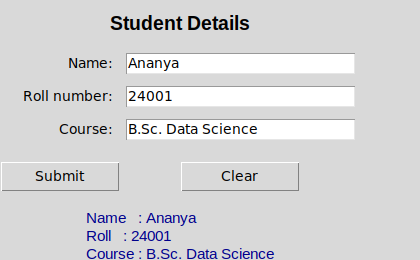
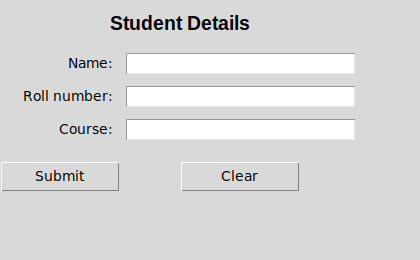
The window after Submit, and after Clear.
RESULT
Submit shows the three entries in the output label; Clear empties the form; and Submit with the name missing raises the warning and shows nothing.
Experiment 18 — Tkinter — calculator
1. Question
Unit 5. A simple calculator application in Tkinter.
2. Aim
Build a calculator whose buttons all share one handler, and keep its eval() safe.
3. Steps
- The display and the buttons.
- One handler for every button.
- Evaluate, safely.
- Start the event loop.
THE METHOD
For the calculator, note the security comment in the file: eval() is used on
a validated character set with empty builtins. eval() on unfiltered user
input is a genuine vulnerability — say so if asked, because it demonstrates
judgement beyond the syllabus.
4. Programme
"""Experiment 18: A simple calculator application in Tkinter.

Syllabus: Course 3, Unit 5 -- GUI programming with Tkinter.

Run for the lab page under a virtual display (xvfb-run) by
_drive_18_tkinter_calculator.py, which presses its buttons and asserts what the display
shows. Run it locally with `python3 18_tkinter_calculator.py`.

Note on eval(): this uses a restricted eval with the character set validated
first. eval() on unfiltered user input is a security hole -- never do it in a
real application.
"""

import tkinter as tk

ALLOWED = set("0123456789+-*/(). ")


class Calculator:
    def __init__(self, root):
        self.root = root
        root.title("Calculator")
        root.geometry("300x380")
        root.resizable(False, False)

        self.expression = ""

        # Step 1: The display and the buttons
        self.display = tk.Entry(root, font=("Arial", 20), justify="right",
                                bd=8, relief="sunken")
        self.display.grid(row=0, column=0, columnspan=4, sticky="we",
                          padx=5, pady=10, ipady=8)

        buttons = [
            ("C", 1, 0), ("(", 1, 1), (")", 1, 2), ("/", 1, 3),
            ("7", 2, 0), ("8", 2, 1), ("9", 2, 2), ("*", 2, 3),
            ("4", 3, 0), ("5", 3, 1), ("6", 3, 2), ("-", 3, 3),
            ("1", 4, 0), ("2", 4, 1), ("3", 4, 2), ("+", 4, 3),
            ("0", 5, 0), (".", 5, 1), ("<", 5, 2), ("=", 5, 3),
        ]

        for text, row, col in buttons:
            tk.Button(root, text=text, font=("Arial", 15), width=4, height=2,
                      command=lambda t=text: self.on_click(t)
                      ).grid(row=row, column=col, padx=3, pady=3)

    # Step 2: One handler for every button
    def on_click(self, key):
        """Single event handler for every button."""
        if key == "C":
            self.expression = ""
        elif key == "<":
            self.expression = self.expression[:-1]
        elif key == "=":
            self.evaluate()
            return
        else:
            self.expression += key
        self.refresh()

    # Step 3: Evaluate, safely
    def evaluate(self):
        if not self.expression:
            return
        if not set(self.expression) <= ALLOWED:
            self.show("Error")
            self.expression = ""
            return
        try:
            # Empty globals/builtins: nothing but arithmetic can be reached.
            result = eval(self.expression, {"__builtins__": {}}, {})
            self.expression = str(result)
        except ZeroDivisionError:
            self.expression = ""
            self.show("Cannot divide by zero")
            return
        except (SyntaxError, NameError, TypeError):
            self.expression = ""
            self.show("Error")
            return
        self.refresh()

    def refresh(self):
        self.show(self.expression)

    def show(self, text):
        self.display.delete(0, tk.END)
        self.display.insert(0, text)


if __name__ == "__main__":
    # Step 4: Start the event loop
    window = tk.Tk()
    Calculator(window)
    window.mainloop()
5. Execution and Results
OUTPUT
press 1 2 + 7 * 3 =   display: '33'   (precedence: * before +)
  [screenshot 1: after 12+7*3=]
press C ( 1 2 + 7 ) * 3 =   display: '57'   (brackets first)
press C 7 / 2 =   display: '3.5'   (true division)
press C 8 / 0 =   display: 'Cannot divide by zero'   (division by zero, caught)
  [screenshot 2: after C8/0=]
press C 2 * * 3 =   display: '8'   (** is two * keys, so the character check lets it through)
press C 9 < < =   display: ''   (< deletes, so 9 then two deletes leaves nothing to evaluate)

an expression with letters, set directly: display 'Error'
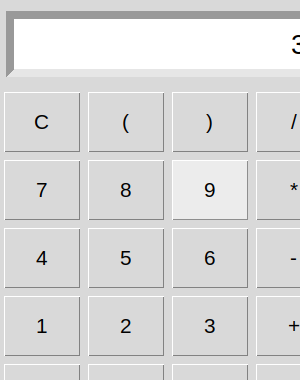
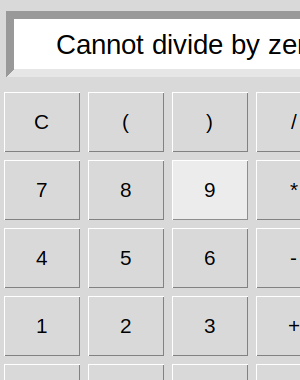
The window after 12+7*3=, and after 8/0=.
Note that ** is two * keys, so the character check lets powers through: 2**3 gives 8. The
check limits which characters can reach eval(), not which expressions — which is why the
empty builtins are needed as well.
The window is cut off on the right and at the bottom. The program fixes it at 300 × 380 and
makes it not resizable, but with the fonts of the Linux machine it ran on, the buttons ask for
336 × 428, so the last column and the bottom row (0, ., <, =) are clipped; they still work, and
the driver pressed them. Fonts differ between systems, and Windows' narrower Arial may fit.
Leaving out geometry() and resizable(), so that Tk sizes the window to its widgets, makes it
fit everywhere.
RESULT
12+7×3 gives 33 and (12+7)×3 gives 57, so precedence and brackets work; 7/2 gives 3.5; 8/0 shows "Cannot divide by zero"; and an expression with letters in it is refused before eval() sees it.
Lab exam tips
-
Watch your indentation. It is the most common cause of a program that will not run at all. Four spaces, never tabs.
-
Convert
input().int(input(...))orfloat(input(...)). - Print prompts before every input.
-
Test the edge cases: an empty list, n = 0, a negative number, a missing file, a division by zero.
-
Use meaningful names.
student_marks, notsm. -
Add a docstring to every function you define — the syllabus lists documentation strings explicitly, and it is free marks.
-
Expect a viva. "Why a dictionary here rather than a list?" and "what happens if the file does not exist?" are the standard questions.
What the practical record should contain
For each experiment, the five parts set out above: 1. Question, the task as set; 2. Aim, in one line; 3. Steps, the method in numbered steps; 4. Programme, the program, each step marked by a comment; 5. Execution and Results, what it printed when it was run, and the result in words.
Each program, on its own page
The same experiments, one page each, so a program can be reached by what it does rather than by its number.